
Download PromptFlow – Free AI Image Generation Tool for Windows, Mac, Android & iOS
Overview
PromptFlow is a cloud‑based AI image generation platform that transforms simple text prompts into high‑resolution visuals in seconds. Designed for creators of every skill level, the service combines cutting‑edge diffusion and transformer models with an intuitive, browser‑first interface, allowing users to search existing image libraries, refine results with powerful filters, or start a brand‑new creation from scratch. Whether you are a marketer looking for eye‑catching social media graphics, a designer needing concept art for a client pitch, an educator seeking custom illustrations for lesson plans, or a hobbyist experimenting with digital art, PromptFlow provides a seamless workflow that eliminates the need for expensive hardware or complex software installations.
The platform’s secure login system stores your favorite prompts, generated assets, and custom settings in the cloud, making it easy to pick up where you left off on any device. Because all heavy lifting is performed on PromptFlow’s remote servers, the tool runs smoothly on low‑spec laptops, tablets, and even smartphones, as long as you have a modern web browser and a stable internet connection. Continuous updates bring the latest AI models, style packs, and feature enhancements, ensuring that your visual output stays fresh, competitive, and aligned with industry trends.
In short, PromptFlow is a versatile, free, and secure solution that democratizes AI‑powered image creation for anyone who needs quality visuals quickly and reliably.
Features, Installation & Compatibility
Core Features & Benefits
- Prompt‑Driven Search: Type natural language queries such as “vintage travel poster” or “realistic cat portrait” and receive instantly relevant images curated by AI.
- Multiple AI Engines: Switch between Stable Diffusion, DALL·E‑style, and custom style models to match the desired aesthetic, from photorealism to abstract illustration.
- Advanced Filtering Options: Refine results by resolution, aspect ratio, color palette, artistic medium, and even mood tags to narrow down exactly what you need.
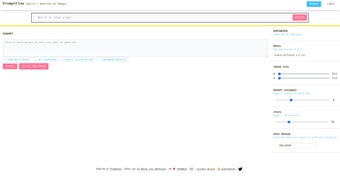
- Creative Workspace: Use the “Create” tab to generate brand‑new images, tweak parameters like creativity, detail, and lighting, and view real‑time variations.
- Secure Cloud Accounts: Save prompts, favorite images, and project folders to a protected cloud profile that syncs across all your devices.
- Cross‑Platform Accessibility: Operates in any modern browser on Windows, macOS, Linux, Android, and iOS—no downloads, no installations.
- Regular Model Updates: New AI models, style packs, and feature enhancements are added monthly, keeping the library on the cutting edge.
- High‑Resolution Export: Download images in PNG, JPEG, or SVG up to 4K resolution for print‑ready quality, with optional premium upgrades for larger sizes.
- Free Tier with Premium Options: Unlimited basic generation is free; paid plans unlock faster queues, batch processing, and ultra‑high‑resolution renders.
Installation & First‑Time Setup
PromptFlow eliminates the traditional installation hurdle entirely. To begin, open a supported browser (Chrome, Edge, Firefox, or Safari) and navigate to promptflow.ai. The landing page greets you with a clean, minimalist dashboard that highlights both the “Search” and “Create” functionalities.
Signing up takes less than a minute—simply enter an email address, or connect via Google or Apple ID. After confirming your email (if you chose that method), you are instantly logged into your personal workspace. Because the service runs on remote servers, there is nothing to download, no system drivers to install, and no GPU requirements on your device.
This design makes PromptFlow ideal for students using school computers, freelancers on shared workstations, or anyone who prefers a lightweight, cloud‑first approach.
Step‑by‑Step Usage Guide
- Enter a Prompt: Type a clear, descriptive sentence—e.g., “a futuristic city skyline at sunset, cyberpunk style.”
- Select an AI Model: Choose the default model for balanced results, or pick a specialty model for stylized output (cartoon, photorealistic, watercolor, etc.).
- Apply Filters: Use the sidebar to set resolution, aspect ratio, color scheme, or mood tags that narrow the AI’s focus.
- Generate & Review: Click “Generate.” The platform returns a grid of thumbnails; select any to view a larger preview, then adjust sliders for creativity, detail, or lighting to fine‑tune the image.
- Save or Export: Add the final image to your cloud library, download it in your chosen format, or copy a shareable link for collaboration.
- Reuse & Iterate: Access your prompt history at any time, duplicate previous sessions, or modify a saved prompt to explore new variations without starting from scratch.
Compatibility Across Devices
Since PromptFlow is accessed through a web browser, it works on virtually any operating system that supports modern web standards. Officially supported environments include:
- Windows 10, 11 – Chrome, Edge, Firefox
- macOS Ventura, Monterey – Safari, Chrome, Firefox
- Linux distributions with up‑to‑date browsers (Chrome, Firefox)
- Android 9+ – Chrome, Firefox
- iOS 14+ – Safari, Chrome
Because the heavy AI processing happens on PromptFlow’s cloud infrastructure, your device’s CPU or GPU performance only affects the responsiveness of the user interface, not the speed of image generation. This means you can comfortably run PromptFlow on a budget laptop, a tablet, or even a smartphone without sacrificing output quality.
Pros, Cons & Frequently Asked Questions
Pros
- Completely free core features—no hidden subscription fees for basic use.
- No software download; works directly in any modern web browser.
- Wide selection of AI models, styles, and advanced filtering options.
- Intuitive, beginner‑friendly UI that also satisfies professional workflows.
- Secure cloud accounts with encrypted data storage and optional 2FA.
- Regular model and feature updates keep the platform ahead of trends.
- Cross‑platform compatibility ensures accessibility on Windows, macOS, Linux, Android, and iOS.
- High‑resolution export options (up to 4K) for print and marketing needs.
Cons
- Premium upgrades are required for ultra‑high‑resolution (8K+) renders and priority processing queues.
- Internet connection is mandatory; offline generation is not possible.
- During peak usage times, generation latency may increase slightly.
- Batch processing capabilities are limited in the free tier, affecting large‑scale projects.
- Some niche artistic styles may still be underrepresented compared with specialized desktop tools.
FAQ – Your Questions Answered
Is PromptFlow really free to use?
Yes. The core functionality—including unlimited prompt searches, basic image generation, and cloud storage—is completely free. Premium subscriptions are optional and only needed for higher‑resolution outputs, faster processing, or batch features.
Do I need a powerful GPU on my computer?
No. All AI computation is performed on PromptFlow’s remote servers. Your device only needs a modern browser and a stable internet connection, making it accessible on low‑spec hardware.
Can I use the generated images for commercial projects?
Absolutely. Images created under the free tier are royalty‑free for commercial use, provided you follow PromptFlow’s content policy and do not redistribute the raw AI model outputs.
How secure is my account and saved data?
PromptFlow employs SSL/TLS encryption for all data in transit and stores user preferences in a protected cloud database. Two‑factor authentication (2FA) is available for added security.
What browsers are officially supported?
The platform supports the latest versions of Chrome, Edge, Firefox, and Safari on both desktop and mobile devices.
Overall Rating: 4.6 out of 5
PromptFlow delivers a seamless blend of search and generation, making AI‑driven visual creation accessible to everyone. The free tier is generous, and the UI feels polished. While premium upgrades are optional, they are reasonably priced for professionals who need 4K assets. The only drawback is occasional latency during peak usage, but this is a minor inconvenience compared with the value provided.
Conclusion & Call to Action
If you’re looking for a fast, secure, and completely free way to generate high‑quality images for blogs, marketing campaigns, presentations, or personal projects, PromptFlow stands out as a top‑tier solution. Its web‑based architecture removes hardware barriers, while the rich set of AI models, filters, and export options ensures you can fine‑tune any visual to match brand guidelines or creative visions. Whether you need a single illustration for a social post or a batch of 4K graphics for a print brochure, PromptFlow’s flexible workflow adapts to the task at hand.
Sign up today, experiment with a few prompts, and discover how effortless AI image creation can be. Ready to boost your visual workflow? Create your free account now and start generating instantly.



.png)



